Musebox March Update: VIP Rewards Program, Smarter Previews & Collection Upgrades

We've been shipping fast this March, and today we're excited to walk you through the three biggest updates that just went live on Musebox. Whether you're a daily creator or just getting started, these changes are designed to reward your loyalty, help you discover templates faster, and make your collection easier to manage.
VIP Loyalty Program
This is the big one. Every Musebox user now has a VIP level, and it starts working from the moment you log in.
The VIP program rewards you with VIP Points (VP) for spending and daily activity. As your VP grows, you level up through 5 tiers — unlocking free credits and permanent discounts along the way.
VIP Levels & Rewards
| Level | VP Required | Free Credits | Credit Discount |
|-------|-------------|-------------|------------------|
| VIP 1 | 0 (everyone starts here) | — | 0% |
| VIP 2 | 1,500 VP | +100 credits | 0% |
| VIP 3 | 5,000 VP | +250 credits | 5% off |
| VIP 4 | 15,000 VP | +500 credits | 10% off |
| VIP 5 | 50,000 VP | +1,500 credits | 15% off |
When you reach a new level, a Claim button appears in your VIP panel. Tap it, and the free credits are instantly added to your balance. Discounts apply automatically — no coupon codes needed.
How to Earn VP
There are three ways to earn VIP Points:
1. Make purchases — Every dollar you spend earns you 100 VP. All payment methods count equally.
2. Daily Login — Just visiting Musebox earns you +5 VP per day. It's automatic — just open the app.
3. Login Streak — Log in for 7 days in a row and earn a +10 VP bonus. That's up to 45 VP per week just from showing up.
VIP Discounts
Starting at VIP 3, you get a permanent discount on every credit purchase:
- VIP 3: 5% off
- VIP 4: 10% off
- VIP 5: 15% off
The discount is applied automatically at checkout — nothing extra to do on your end.
Find Your VIP Badge
Your VIP level is always visible as a crown badge 👑 in the top header bar. Tap it to open the full VIP panel:
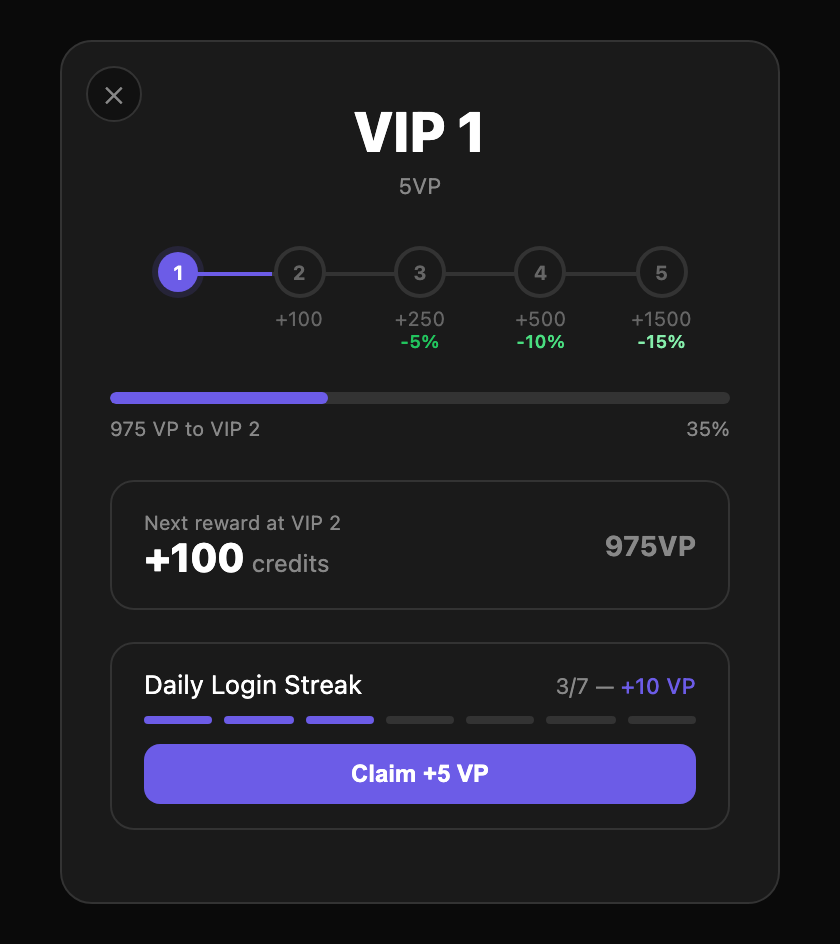
> How to get there: Open musebox.ai → look at the top bar → tap the 👑 VIP badge next to your balance
Template Preview Upgrades
We've completely reworked how template cards look and behave on the Explore page.
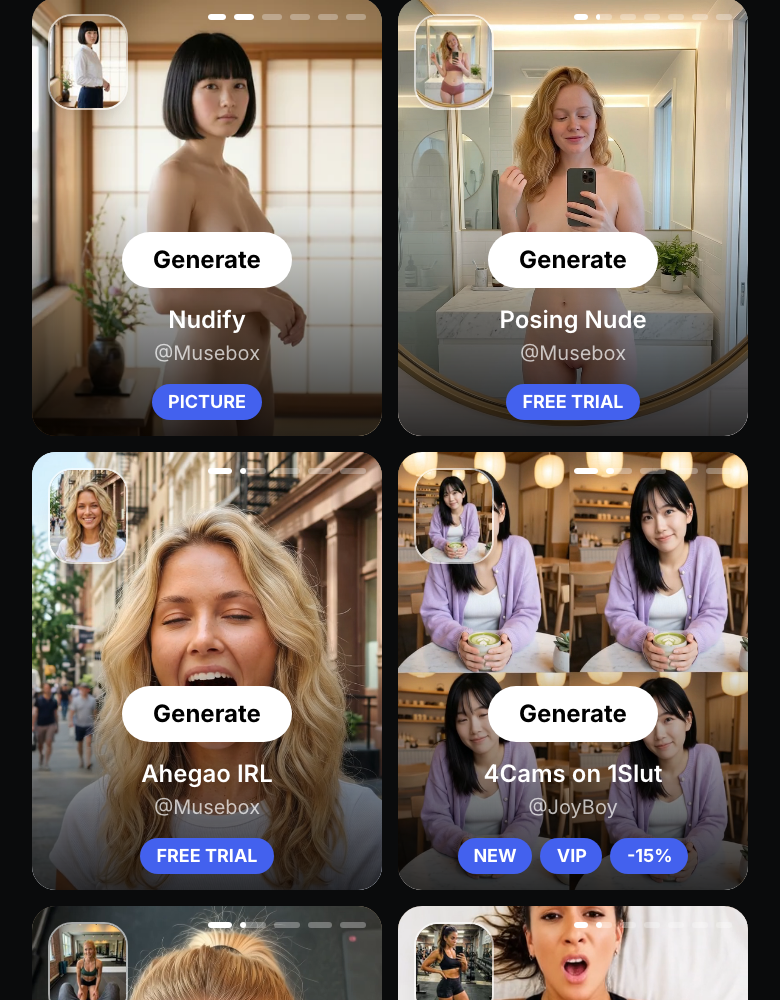
> How to get there: Open musebox.ai → tap "Explore" in the bottom navigation bar (or top menu on desktop)
Infinite Carousel
Template cards with multiple previews now loop seamlessly. Swipe left/right on mobile or click the arrows on desktop to browse all preview slides — when you reach the last one, it wraps back to the first. No more dead ends. Small dot indicators at the top show which slide you're on.
Autoplay Videos
On desktop: hover over any template card and the preview video plays automatically. You'll see a progress bar at the top of the card showing playback position.
On mobile: videos auto-play as you scroll through the Explore feed — no need to tap.
"NEW" Badge
Fresh templates now display a NEW badge so you can instantly spot what's been added recently.
Before & After Thumbnails
For templates that transform your photos (background change, outfit swap, etc.), you'll see a small source thumbnail showing the original image next to the result — so you know exactly what the template does before trying it.
Collection Improvements
Your generated content deserves a better home. Here's what changed:
> How to get there: Open musebox.ai → tap "Collection" in the bottom navigation bar → select any generation to see the new preview
Faster Downloads
The download button ⬇️ moved to the top-right corner of the preview — easier to reach with one hand, cleaner design, with a loading spinner so you always know when it's working.
Video & Image Toggle
Many generations produce both a video and a still image. You'll see a toggle switch in the preview — tap it to switch between the video and the photo version instantly.
Rate Your Results
We've added 👍 like and 👎 dislike buttons below every preview image. Love a generation? Hit the thumbs up. Not happy with the result? Tap thumbs down. Your feedback directly helps us improve template quality and ranking.
What's Next
We're working on more VIP perks, new template categories, and some exciting features we can't talk about yet. The best way to stay in the loop? Log in daily — you'll earn VP and be the first to see what's new.
Open Musebox and check your VIP status →
Follow us for updates: