Bulk Generation & Light Theme on Musebox — May 2026 Feature Update

We pushed two long-requested features this week. Bulk Generation lets you queue 20 photos × multiple templates in one click instead of clicking Generate one-by-one for an hour. And Light Theme finally gives you the option to use Musebox in bright daylight without burning your retinas.
Both are live right now on musebox.ai and on the mobile web — no app update needed.
Bulk Generation — Stop Clicking Generate 60 Times
If you've ever opened 15 tabs to fire 15 separate generations on the same template, this one is for you. Bulk Generation collapses that workflow into a single submission.
How it works:
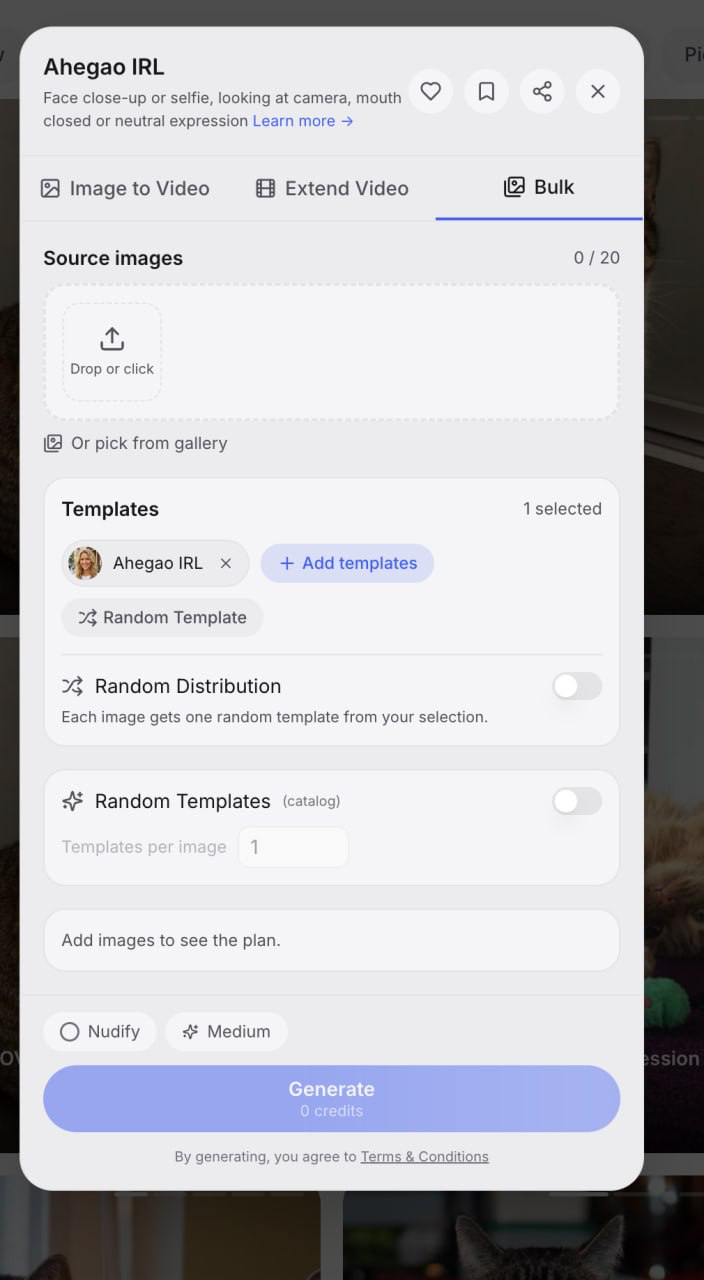
- The current template is selected by default
- Click + Add templates to mix in others (Doggystyle + Missionary + Cowgirl in one batch — yes)
- Or hit Random Template and let the catalogue pick for you
- Random Distribution — each photo gets ONE random template from your selection. Best when you have 20 photos and want them spread across 5 templates without manually assigning
- Random Templates (catalog mode) — for each photo, randomly pull templates from the entire catalogue. Great for batch exploration when you don't know which template fits which face yet
Why this matters:
- Throughput: a 20-photo × 3-template batch = 60 generations queued in one click. Same workflow used to take a full evening of tab-juggling.
- Cost preview: the plan panel shows you exact credit cost before you commit — no surprises after submission.
- No babysitting: completed clips land in your Collection as they finish. Reload whenever, they'll be waiting.
Best practical use case: content creators producing multi-clip sets for social channels and subscription platforms. Drop your entire shoot's photos in once, pick the templates you want covered, walk away. Come back to 60 ready clips.
Light Theme — Available Now in the Menu
Dark mode has been the only option since launch. We finally added a clean Light Theme alongside it for everyone who works in bright environments or just prefers white interfaces.
How to switch:
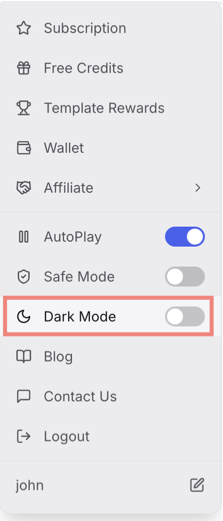
Your choice persists across sessions and devices — set it once, it follows you.
Why bother:
- Daylight productivity — phone in bright sun, laptop at outdoor cafés, no more squinting
- Accessibility — Light Theme offers stronger contrast for users with certain vision differences
- Habit — many users simply prefer the cleaner aesthetic
Both themes get equal love going forward — every new screen we ship will look polished in both modes.
What's Next
Already on the roadmap and shipping in the next few weeks:
- Bulk for Extend Video — queue up extend chains the same way, so you can stretch 10 finished clips into long-form output in one submission
- Saved bulk presets — pin your favourite template combos and recall them with one click
- Theme auto-switch — follow your system Dark/Light preference automatically
Both Bulk Generation and Light Theme are available right now to every Musebox user — no settings to flip, no waitlist, no paywall.